Move a Device
Goal
In this tutorial you will make your first controlled motor move and confirm the result from the CLI. By the end, you will know the difference between a blocking move for learning and a non-blocking move for more advanced workflows.
Before you start
Continue in a session where the demo configuration is already loaded, so dev.samx is available.
1. Check the current position
Start by printing the current state of the motor:
dev.samx.wm
┏━━━━━━┳━━━━━━━━━━┳━━━━━━━━━━┳━━━━━━━━━━━┓
┃      ┃ readback ┃ setpoint ┃  limits   ┃
┡━━━━━━╇━━━━━━━━━━╇━━━━━━━━━━╇━━━━━━━━━━━┩
│ samx │  0.0000  │  0.0000  │ [-50, 50] │
└──────┴──────────┴──────────┴───────────┘
2. Make and confirm a blocking move
Use umv to issues a move command which waits until the device reaches the requested position:
scans.umv(dev.samx, 10, relative=False)  # make the move
dev.samx.wm  # check the move is done
PASSED [100%] samx:      0.00 ━━━━━━━━━━━━━━━       9.99 /      10.00 / 100 % 0:00:00 0:00:00
┏━━━━━━┳━━━━━━━━━━┳━━━━━━━━━━┳━━━━━━━━━━━┓
┃      ┃ readback ┃ setpoint ┃  limits   ┃
┡━━━━━━╇━━━━━━━━━━╇━━━━━━━━━━╇━━━━━━━━━━━┩
│ samx │ 10.0000  │ 10.0000  │ [-50, 50] │
└──────┴──────────┴──────────┴───────────┘
While the motor is moving, BEC shows a progress bar in the terminal so you can follow the motion until the requested position is reached.
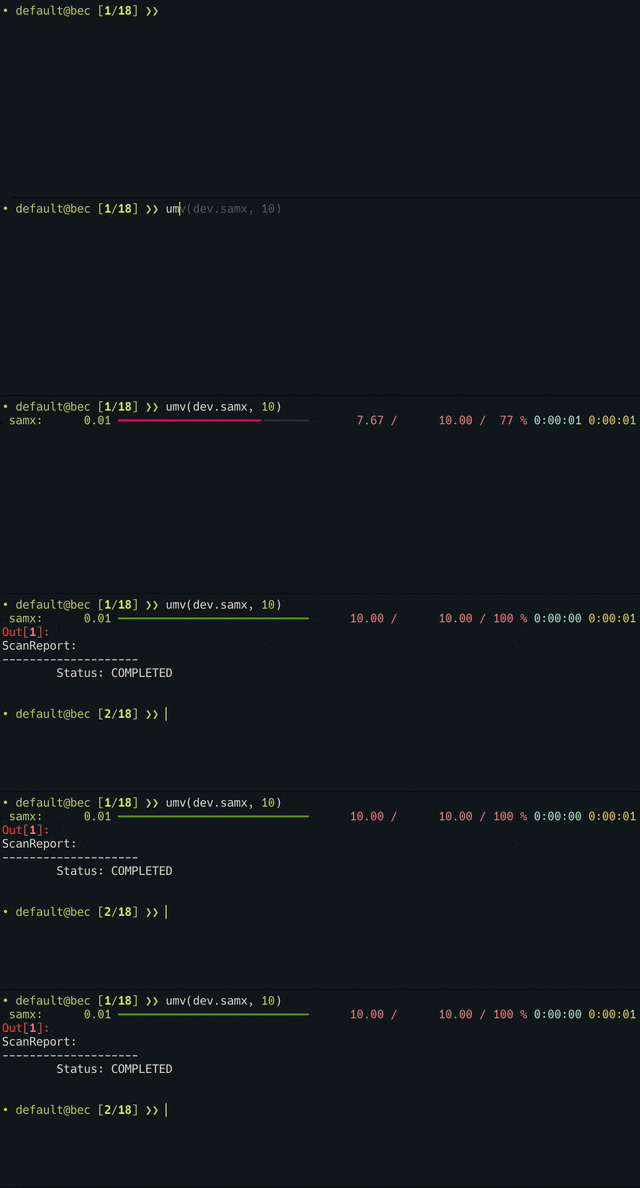
When the command returns, the move is complete or BEC has raised an error. The same output also shows the motor state after the move, so you can confirm that the readback is close to the requested target position.
3. Move the motor back
Return to a neutral position:
umv(dev.samx, 0)
What you have learned
You checked a motor state, executed a safe blocking move, and confirmed the result from the shell.
Next step
Continue with 04 Run your first scan, where you will use the same training devices in your first simple scan.