RPC GUI Control
The BEC IPython client can control GUI widgets through RPC. This lets users create widgets, configure plots, load profiles, and script GUI behaviour from the command line.
Main objects
gui is the client-side GUI entry point. It exposes windows, available widget classes, and
helpers to create or show GUI elements.
gui.bec is the default Dock Area opened by the Terminal + Dock launcher mode. It is a
client-side reference to a BECDockArea running in the GUI process.
gui.available_widgets lists widget classes that can be created remotely:
gui.bec.new(gui.available_widgets.Waveform)
RPC references
Objects returned by the GUI client are RPC references. A variable such as wf does not contain
the Qt widget itself. It contains a reference that sends allowed method calls and property access
to the GUI process.
wf = gui.bec.new(gui.available_widgets.Waveform)
wf.plot(device_x=dev.samx, device_y=dev.bpm4i)
The Dock Area also exposes created widgets through a dynamic namespace. The first Waveform in
gui.bec can usually be reached as:
gui.bec.Waveform
If a widget is deleted, an existing RPC reference to that widget is no longer useful. Get a new reference from the Dock Area namespace, create the widget again, or reload the profile that contains it.
CLI access pattern
The command-line namespace follows the GUI widget hierarchy. A parent object, such as gui.bec, exposes the widgets
that belong to it. A child widget, such as gui.bec.Waveform, exposes its own child items and user-facing methods.
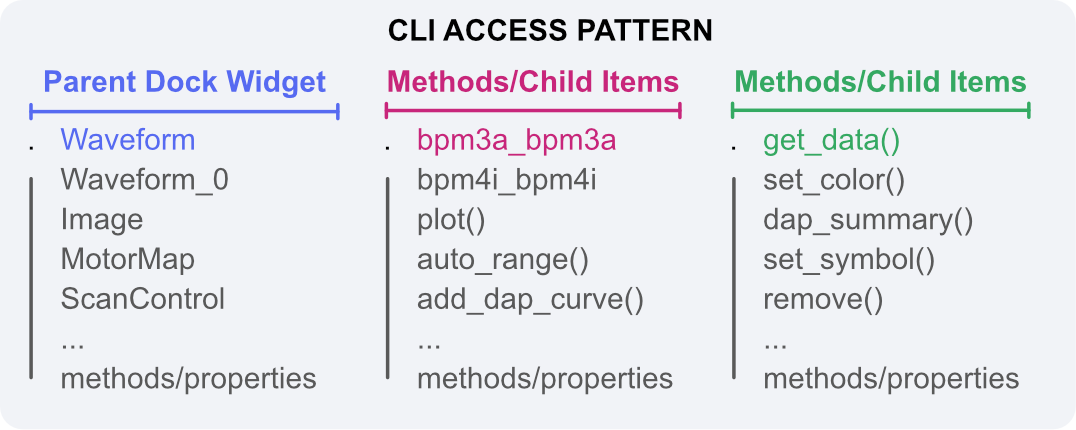
This hierarchy is based on the Qt parent/child object model. In Qt, a QObject can have a parent and can be found
through the parent's child tree; see the
PySide6 QObject documentation for the underlying
object-tree behavior.
BEC Widgets uses this Qt hierarchy to decide where an object appears in the CLI:
- A BEC widget registers itself for RPC when it is exposed to the command-line interface.
- Its parent is resolved by walking up the Qt parent chain to the nearest RPC-visible BEC widget.
- The GUI server publishes this registry to the IPython client.
- The IPython client attaches each child reference below its parent reference.
For example, a Waveform created inside the default Dock Area is available below gui.bec:
wf = gui.bec.Waveform
Curves or child items created by that Waveform are then available below the Waveform reference when they are exposed through the same RPC mechanism:
curve = wf.bpm4i_bpm4i
The CLI does not show every internal Qt object. It shows BEC Widgets objects that are RPC-visible and have a generated client-side reference. Internal Qt controls, layout objects, and hidden implementation widgets are intentionally left out of the command namespace.
Exposed API surface
Only methods and properties listed in a widget's USER_ACCESS are exposed through RPC. This is
intentional: it keeps command-line control focused on stable user-facing operations instead of
internal Qt implementation details.
Examples of exposed operations include:
gui.bec.new(...)to add a widget to a Dock Area.gui.bec.load_profile(...)to load a Dock Area profile.gui.bec.load_profile(..., restore_baseline=True)to load the baseline version of a profile.gui.bec.restore_baseline_profile(..., show_dialog=False)for scripted profile restore.wf.plot(...)andwf.get_dap_summary()for Waveform control.
Timeouts and long operations
RPC calls wait for the GUI process to complete the requested operation. Most calls return quickly, but profile loading, history access, or data-heavy plotting may take longer. If a call times out, check whether the GUI process is responsive and whether the operation requested a very large data set.
For repeatable workflows, prefer loading a saved profile first and then changing only the widget settings that depend on the current experiment.