Inspect a Device from the BEC IPython Client
Overview
Inspect a device from the BEC IPython client so you can see its summary, live values, and configuration-style signals.
Prerequisites
- You have a running BEC IPython client session.
- A device configuration is already loaded.
- You know the device name you want to inspect, for example
samx.
1. List the available devices
Start by checking which devices are available in the current session:
dev.show_all()
This prints the devices known to the client together with status information such as whether they are enabled and which class they use.
Use tab completion
Type dev. and press TAB to explore available device names directly in the shell.
2. Print the device overview
To inspect one device in more detail, evaluate the device object:
dev.samx
              SimPositioner: samx
 Enabled           True
 Description
 Read only         False
 Software Trigger  False
 Device class      ophyd_devices.SimPositioner
 Readout Priority  baseline
 Device tags       user motors
 Limits            [-50, 50]

                       Current Values
 Signal                Value             Timestamp
 samx                  9.99789260545663  2026-04-01 14:43:52
 samx_setpoint         10.0              2026-04-01 14:43:52
 samx_motor_is_moving  0                 2026-04-01 14:43:52

  Config Signals
 Signal     Value
 tolerance  0.01
This prints a compact overview of the device, including:
- general metadata such as
enabled,readoutPriority, and device class - current values
- config signals
Use this first when you want a quick overview without manually calling several methods.
Whether a signal is included in .read() or .read_configuration() depends on its ophyd Kind. Learn more about ophyd Kind
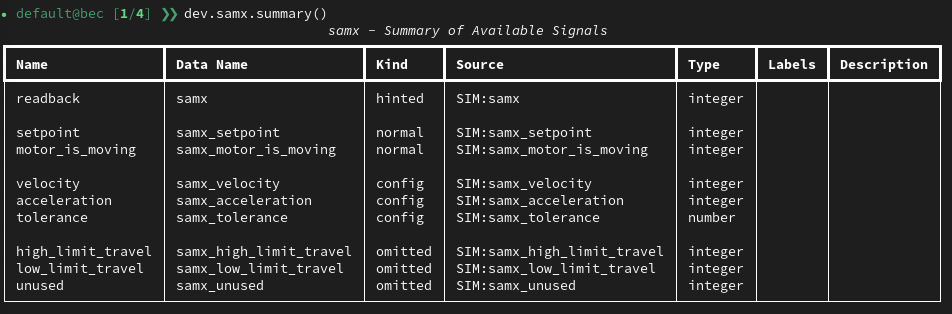
3. Print the device summary
To get a more detailed summary of the device, including all its defined signals and their ophyd Kinds, call
dev.samx.summary()
3. Read the live values
To inspect the current read values directly, call read():
dev.samx.read()
{'samx': {'value': 0, 'timestamp': 1774874622.037339},
 'samx_setpoint': {'value': 0, 'timestamp': 1774873374.7518551},
 'samx_motor_is_moving': {'value': 0, 'timestamp': 1774873374.751864}}
This is the fastest way to see the device's current readings in dictionary form.
For positioners, you can also use wm for a compact readback and setpoint view:
dev.samx.wm
4. Read the config signals
To inspect the configuration-style signals, call read_configuration():
dev.samx.read_configuration()
Use this when you specifically want values that belong to the device setup rather than the normal read() output.
Congratulations!
You can now inspect a device from the BEC IPython client with dev.show_all(), dev.<name>, dev.<name>.read(), and dev.<name>.read_configuration().
Common Pitfalls
dev.samxprints a summary, but it does not return the same structure asdev.samx.read().- If
dev.samxdoes not exist, the device is either not loaded or has a different name in the current config. read()andread_configuration()serve different purposes. If a value is missing fromread(), check whether it is a config signal instead.
Next Steps
- If you want to change a signal-backed configuration value from the client, continue with Change Config Signals from the BEC IPython Client.