Fit Waveform Data with DAP
Goal
Attach DAP model curves to Waveform data from the BEC IPython client and inspect the fit output.
Use this guide when a Waveform already has a source curve, and you want to fit the curve and plot the fitted curve on top. For basic Waveform creation, plotting, and curve styling, start with Control a Waveform from the IPython Client.
Prerequisites
- BEC is running with a Dock Area.
- The
samxandbpm4idevices are available indev. - A Waveform source curve exists, or you are ready to create one.
Device names
In these examples, samx is a simulated positioner motor and bpm4i is a Beam Position Monitor.
1. Create a source curve
Create a Waveform and plot bpm4i against the samx motor position:
wf = gui.bec.new(gui.available_widgets.Waveform)
wf.plot(device_x=dev.samx, device_y=dev.bpm4i)
Run a scan to produce data:
scans.line_scan(dev.samx, -5, 5, steps=25, exp_time=0.1, relative=False)
The default source curve label is bpm4i-bpm4i, built from the y-axis device and signal.
2. Add a DAP curve to an existing curve
Attach a Gaussian Data Analysis Pipeline (DAP) to the existing bpm4i-bpm4i curve:
wf.add_dap_curve(device_label="bpm4i-bpm4i", dap_name="GaussianModel")
device_label is the existing source curve to fit. dap_name is the DAP model to attach to that source curve.
3. Initialize the curve with a fitting model
If you know in advance that your plot should also include a fit, add it in the initial plot call:
wf.plot(device_x=dev.samx, device_y=dev.bpm4i, dap="GaussianModel")
Do not call plot again with the same device pair after the source curve already exists. That creates a duplicate
source curve and raises an error. Use wf.add_dap_curve(...) to add a DAP model to an existing curve.
4. Use multiple DAP models
dap_name can also be a list of model names when you want a composite model:
wf.add_dap_curve(
    device_label="bpm4i-bpm4i",
    dap_name=["GaussianModel", "LinearModel"],
)
You can pass parameter overrides with dap_parameters. For composite models, pass either a list aligned with the model
list or a dictionary keyed by model name:
wf.add_dap_curve(
    device_label="bpm4i-bpm4i",
    dap_name=["GaussianModel", "LinearModel"],
    dap_parameters={
        "GaussianModel": {
            "center": {"value": 0.0, "vary": True},
            "sigma": {"value": 1.0, "vary": False, "min": 0.0},
        }
    },
)
Use the same model names as the
LMFit built-in models classes, such as GaussianModel,
LinearModel, or ConstantModel.
5. Inspect DAP output
Inspect the DAP result summary:
wf.get_dap_summary()
Inspect the fitted model parameters:
wf.get_dap_params()
DAP curves are also Waveform curve items. You can retrieve and style them in the same way as other curves:
fit_curve = wf.get_curve("bpm4i-bpm4i-GaussianModel")
fit_curve.set_color("orange")
fit_curve.set_pen_width(3)
GUI equivalent
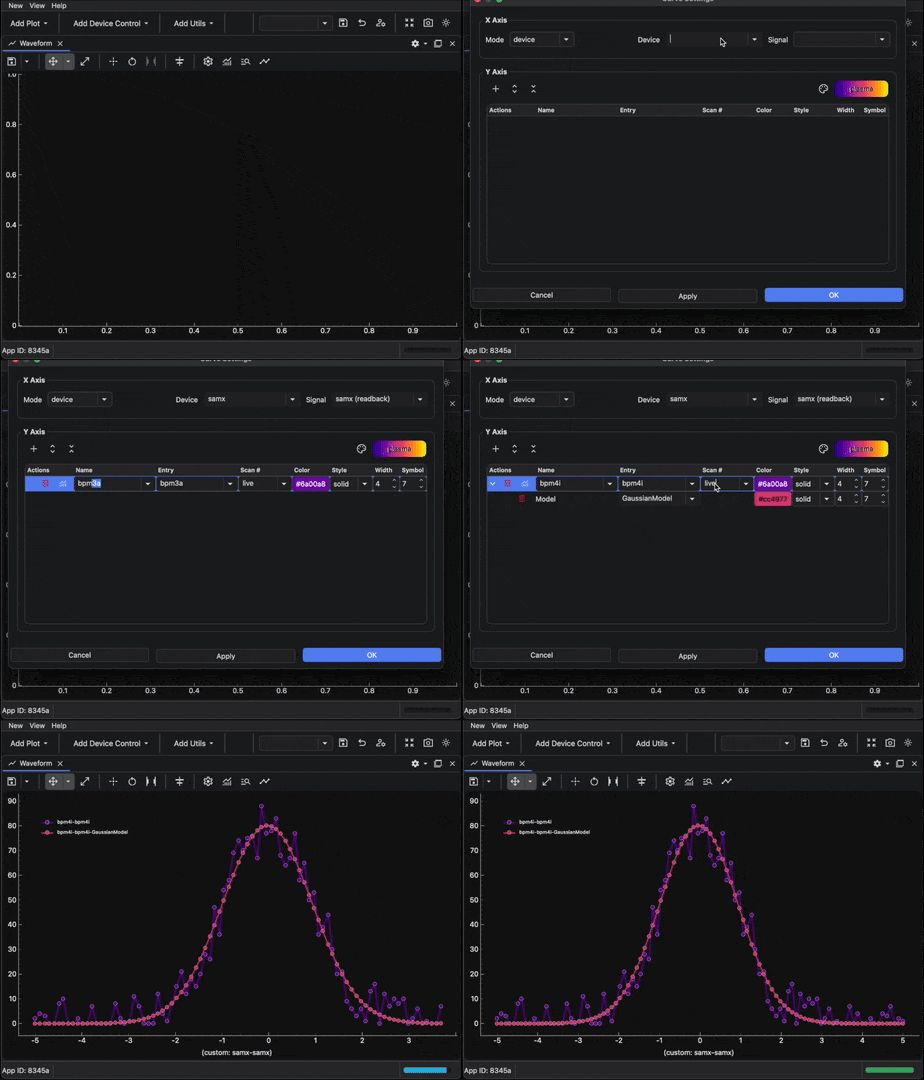
You can configure the same DAP setup from the Waveform curve settings dialog:
- Open the Waveform curve settings dialog from the plot toolbar .
- Set the x-axis mode to
device. - Set the x-axis device to
samx. - Add a y-axis curve for
bpm4i. - Add the
GaussianModelDAP model to the curve. - Confirm the dialog and run the scan.
Result
The Waveform shows the source curve and the fitted DAP model curve, and you can inspect the fitted parameters from the BEC IPython client.