The Dock Area Profile Manager
Use the profile manager when you want to inspect available profiles, check profile metadata, or act on a profile from the GUI.
Open the profile manager
Open the profile manager with the manage button in the Dock Area toolbar.

The profile manager shows the available profiles, profile actions, profile metadata, and a screenshot preview.
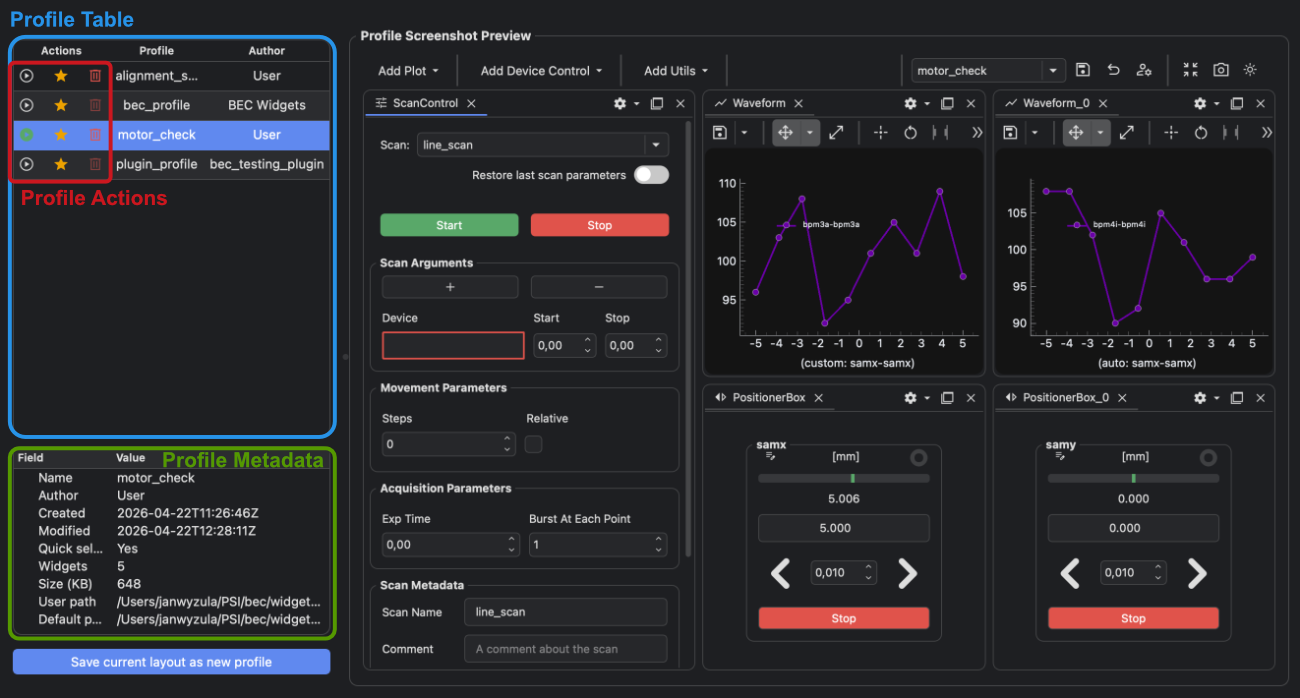
Main areas of the profile manager
The profile manager has four main parts:
- the Actions column with the buttons for switching, toggling quick selection, and deleting
- the profile list, including the profile name and author
- the metadata panel for the selected profile
- the screenshot preview for the selected profile
Actions in the profile manager
| Button | Meaning |
|---|---|
| switch profile button | Load the selected profile into the Dock Area. |
| toggle quick selection button | Show or hide the profile in the toolbar quick selector. |
| delete button | Delete a writable local profile. This button is disabled for bundled read-only profiles. |
Use the task pages when you want the step-by-step workflow:
Metadata shown for the selected profile
| Field | Meaning |
|---|---|
Name |
The saved profile name. |
Author |
The saved author metadata when available. |
Created |
When the profile was first saved. |
Modified |
When the selected profile copy was last updated. |
Quick select |
Whether the profile appears in the toolbar quick selector. |
Widgets |
The number of widgets stored in the profile. |
Size (KB) |
The file size of the selected profile data. |
Runtime path |
The path to the editable runtime profile. Use this when you need the current .ini file for sharing or inspection. |
Baseline path |
The path to the baseline profile used when restoring runtime changes. |
The screenshot preview is stored in the profile file when a screenshot is available during save.
For the workflow that uses the Runtime path field, see
Share a Dock Area Profile with Other Accounts.
Inspect available profiles from the BEC IPython client
To inspect which profiles are available in the current Dock Area namespace from the BEC IPython client, call:
gui.bec.list_profiles()
This returns the available profile names for the current namespace.
Use the Dock Area profile manager when you need more than the names, such as metadata, the screenshot preview, or the
Runtime path and Baseline path fields.
Related topics
- To learn what profiles are, see Dock Area Profiles.
- To learn how runtime and baseline profile copies behave, see Runtime and Baseline Copies.