Change Config Signals from the BEC IPython Client
Overview
Change a signal-backed configuration value from the BEC IPython client and verify the new value on the device.
Prerequisites
- You have a running BEC IPython client session.
- The target device is available in the session, for example
dev.samx. - The value you want to change is exposed as a config signal on the device.
1. Identify the config signal
Inspect the device signals first:
dev.samx.summary()
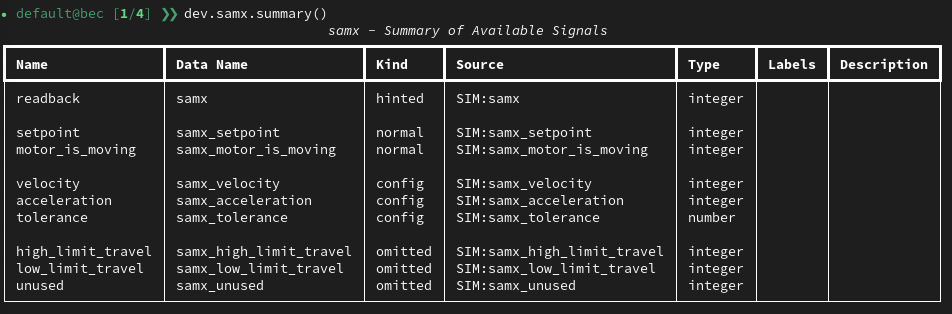
This prints an overview of the device's available signals, including their kind. Use it to find which signals are marked as config.
Whether a signal is included in .read() or .read_configuration() depends on its ophyd Kind. Learn more about ophyd Kind
Then check the configuration-style signals explicitly:
dev.samx.read_configuration()
{'samx_velocity': {'value': 100, 'timestamp': ...},
 'samx_acceleration': {'value': 1, 'timestamp': ...},
 'samx_tolerance': {'value': 0.01, 'timestamp': ...}}
Use this to confirm the exact signal name and the current value before changing it.
2. Change the value
Config signals are exposed as normal device attributes. Set the new value from the client and wait for completion:
dev.samx.velocity.set(20).wait()
Use set(...).wait() when you want the shell command to block until the update has completed.
3. Verify the new value
Read the config signals again:
dev.samx.read_configuration()
You can also inspect the signal directly:
dev.samx.velocity.get()
4. Use device convenience properties when available
Some device settings are exposed through convenience properties on the device object itself. For example, motor limits can be changed like this:
dev.samx.low_limit = -20
dev.samx.high_limit = 20
Or in one call:
dev.samx.limits = [-20, 20]
Check whether something is a signal or a property
In IPython, evaluate the attribute directly and press ENTER if you are not sure whether it is a signal or a convenience property.
dev.samx.velocity
Signal(name=velocity, root_device=samx, enabled=True)
A signal is shown as a signal object.
dev.samx.limits
[-50, 50]
A convenience property resolves immediately to its value.
Congratulations!
You can now inspect config signals with read_configuration(), update them from the BEC IPython client, and verify the result immediately.
Common Pitfalls
- Not every entry in
deviceConfigis a signal-backed config signal.read_configuration()only shows values exposed through ophyd config signals. - Prefer
set(...).wait()over a bareset(...)if you need confirmation that the update finished before the next command runs. - Changing a runtime config signal is not the same as editing the source YAML file. If you need the change to be part of your long-term beamline configuration, also save or update the device config file.
Next Steps
- Use Inspect a Device from the BEC IPython Client when you need a broader device overview before making changes.