Error Handling During Session Updates
During a session update, there are two main stages for each device:
- Creation of the Python object from the device configuration.
- Connection of that object to the underlying hardware.
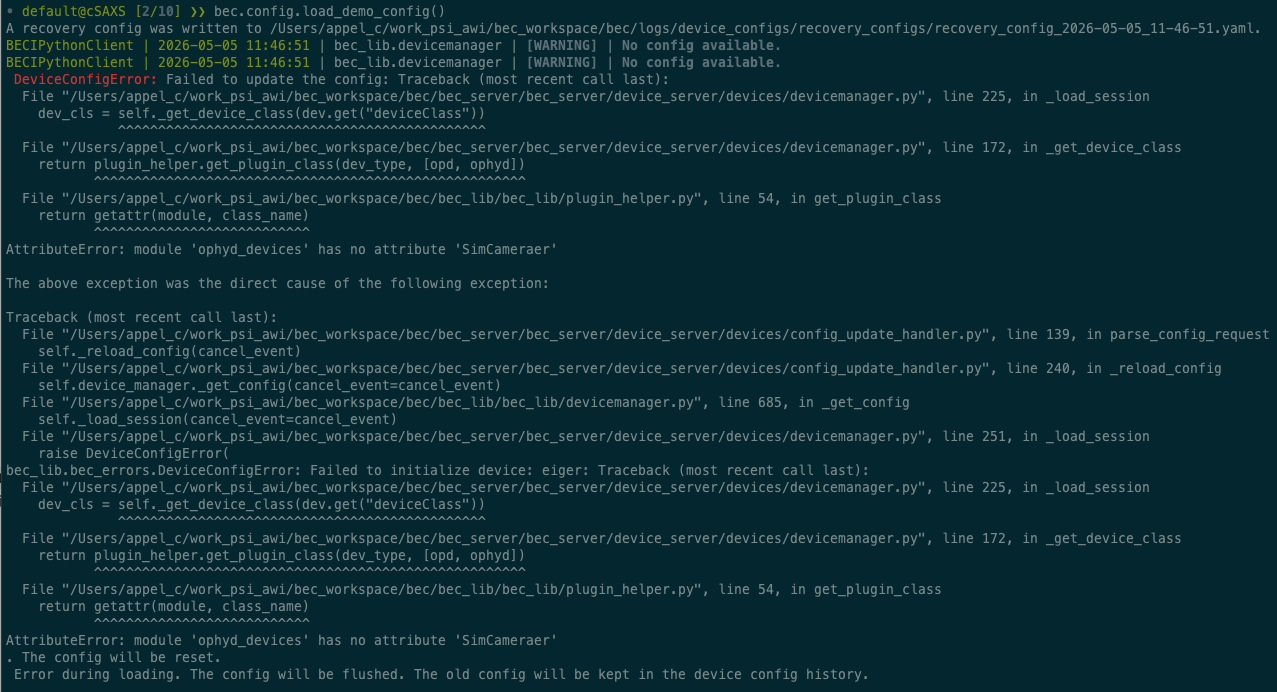
Failures in the first step are treated as critical as BEC will not be able to build the device without changes to the device source code.
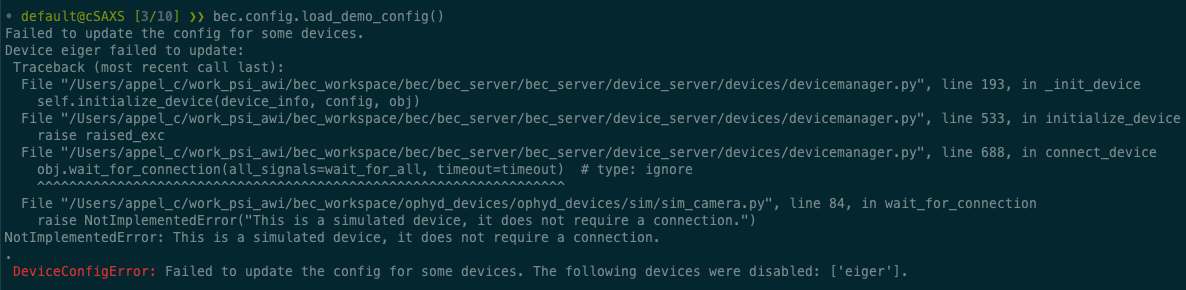
Failures during the second stage can occur e.g. if the device is not yet plugged in or temporarily unavailable. These errors can be handled on a per-device level.\
Scenario 1: A device cannot be created from the configuration
If BEC cannot create a device based on the device configuration, the failure is treated as critical.
Typical reasons include:
- the
deviceClasscannot be resolved - required initialization arguments are missing or invalid
- the init of the class raises an exception during object creation
In this case, BEC does not keep loading the rest of the session as if nothing happened. Instead, the session update fails because the device server cannot safely build a consistent device session.
Tip
To prevent this type of failure, validate your YAML files before loading them. This can catch issues with missing or invalid fields, and it also checks that the specified device classes can be imported successfully. See Validate a YAML configuration file for BEC for more details.
Scenario 2: A device cannot connect to the hardware
If a device cannot connect to the hardware within the configured timeout, the session update continues, but the device will be disabled.
This means:
- the rest of the devices can still be loaded
- the failing device is disabled and clients and services cannot use it during operation until it is re-enabled
Tip
If you have devices that require a long time to connect, consider increasing the connectionTimeout field in your device configuration to avoid unnecessary connection failures. The default timeout is 5s per device, but it can be adjusted based on the expected connection time of your devices.
What happens if the device upload is aborted
If the upload of a new session is cancelled by the user (CTRL-C in the terminal) while the device server is building the new session, BEC will stop the upload of the new session at the next possible point, and reset the active session to a clean state. This means that the current session is flushed, and no devices are loaded.

Info
If you cancel the upload while devices are trying to connect to the hardware, it may take a few seconds for BEC to properly stop the initialization. This is due to the blocking behavior of the connection attempt. Only after reaching the timeout, the user-triggered abort can be processed. During this time, the terminal may appear unresponsive.
Why connection failures are handled differently
BEC can safely represent a device that exists in the session but is disabled. It cannot safely represent a device whose Python object could not be created at all, or a session update that stopped midway in a way that leaves the overall configuration uncertain.
That is why:
- connection failures lead to disabled devices
- object-creation failures lead to an aborted update
- cancelled uploads lead to a reset of the active configuration
To reduce the chance of critical failures, validate YAML files before loading them and check device dependencies carefully.
What to remember
- BEC treats device creation failures and device connection failures differently during session updates.
- If BEC cannot create the Python object for a device, the session update is aborted.
- If a device object is created but cannot connect in time, that device is disabled while the rest of the session can still load.
- Cancelling a session upload resets the active session to a clean state rather than keeping a partially updated configuration.
- Validating YAML files and setting realistic
connectionTimeoutvalues helps avoid avoidable update failures.