Delete a Dock Area Profile
Goal
Delete a locally created Dock Area profile from the Dock Area profile manager.
Prerequisites
- You have BEC open with a Dock Area.
- The profile you want to delete was created locally.
If you do not have profiles yet, first create one with Save and Switch Dock Area Profiles.
Read-only profiles from BEC Widgets or the beamline plugin repository cannot be deleted from the GUI.
1. Open the profile manager
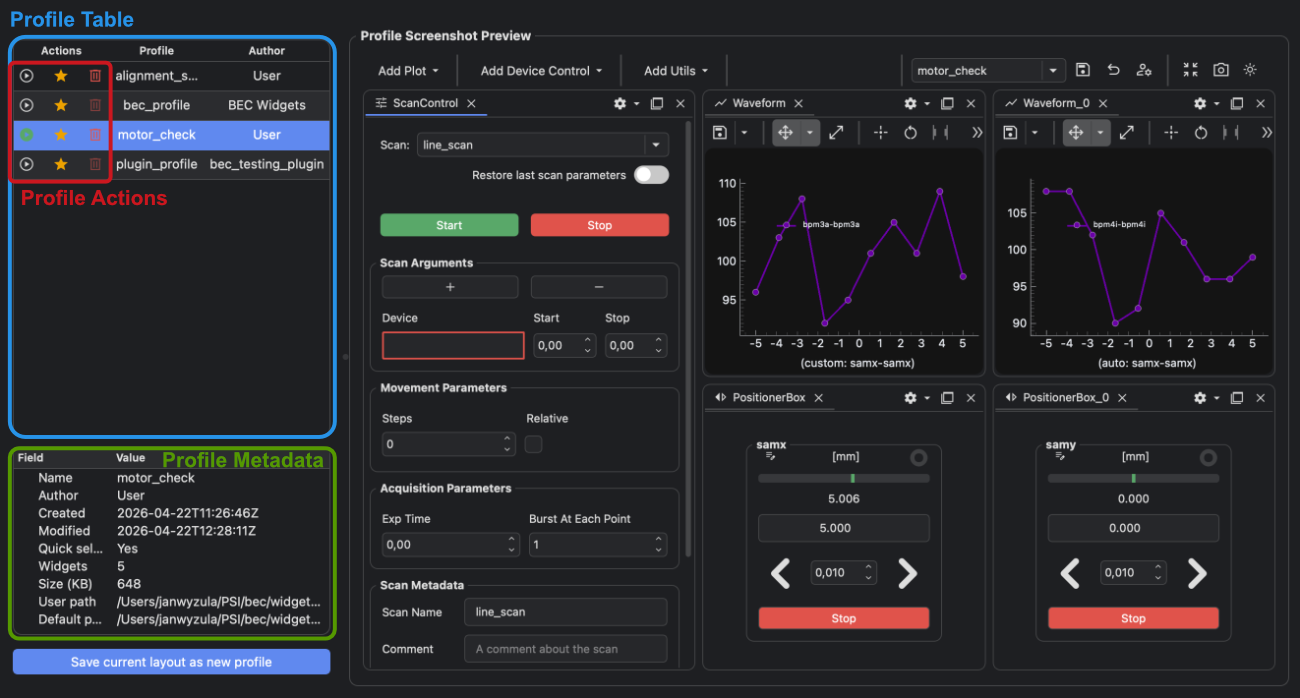
Click the manage button in the Dock Area toolbar.

2. Select the profile
Click the profile you want to delete.
Check the metadata panel before deleting. Profiles from the local settings area can be deleted; bundled read-only profiles cannot.
Learn about Dock Area profile origins
The profile origin controls whether the profile can be deleted from the profile manager.
3. Delete the profile
Click the delete button .
Confirm the deletion when prompted.
Deleting a profile removes the writable copy from the local settings area.
4. Delete from the BEC IPython client
You can delete a local profile from the BECDockArea object in the BEC IPython client:
gui.bec.delete_profile("profile_name")
Replace profile_name with the name shown in the profile manager.
Result
The local profile is removed from the profile manager and no longer appears in the toolbar selector.
Common Pitfalls
- The delete button is disabled for read-only profiles.
- Deleting a local profile cannot be undone from the profile manager.
- To make a useful profile available to other accounts, share it through the plugin repository before deleting your local copy.